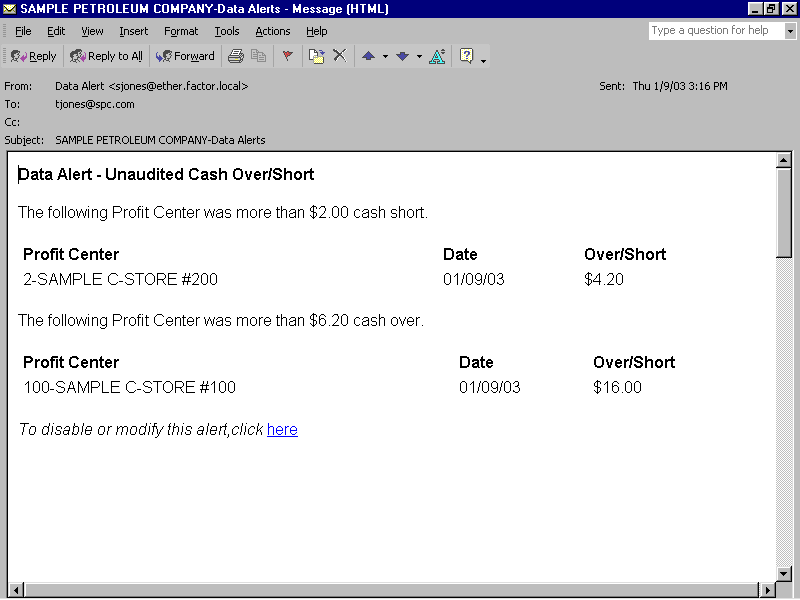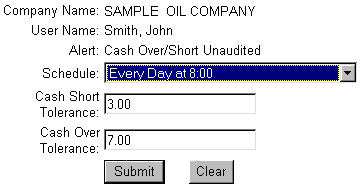
The Unaudited Cash Over/Short data alert provides you with e-mail notification for stores whose over or short amounts exceed the tolerances in the alert definition. The Unaudited Cash Over/Short alert reports data for those store reports that have uploaded from retail profit centers but have not yet been processed. See the following Data Alert File Maintenance form:
The Unaudited Cash Over/Short data alert lets you set two tolerances: Cash Short Tolerance and Cash Over Tolerance. The default value for the tolerances is zero, but you can change the tolerance amounts as needed.
When scheduling the Unaudited Cash Over/Short alert, it's important to remember that the StoreTrak import program initiates the Data Alert Processor, which, in turn, creates this alert. This is important to remember because if you schedule the alert for once a day at a time prior to the import, you will not receive the alert until the following day. For example, you schedule the Unaudited Cash Over/Short alert for 8:00 a.m. every day, but you do not run the StoreTrak Import program until 10:00 am. In this situation, you would not receive the day's over/short alert until 8:00 a.m. the following morning. Consider using the following scheduling options to avoid this delay:
Schedule the alerts to occur for sometime after you run the StoreTrak import.
Schedule the alert to occur twice daily, once in the morning and again in the afternoon.
For step-by-step instructions on creating data alerts, see the Data Alert File Maintenance help topic.
Note: For reporting processed shift report data, see the Audited Cash Over/Short data alert.