Fuel Analysis reports allow users to enter a date and view fuel pump prices, sales for the date, average sales over a seven day period, actual inventory gallons, and the number of days in sales in inventory. This gallon sales and inventory information can be used to assist in dispatching.
Reports display summary information for assigned profit centers.
Note: keep the following things in mind regarding this report:
This report is generated offline. See the offline reports topic for more information.
The number of days sales in inventory is calculated based on the sales for the previous 7 days.
This report displays only primary, non-blended products.
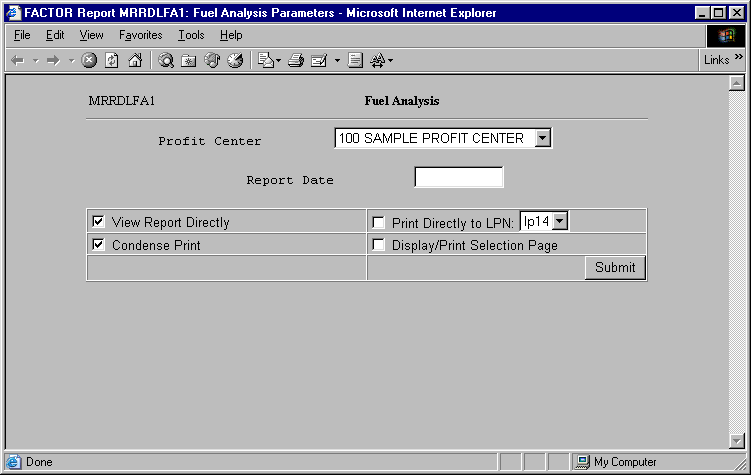
When you select Fuel Analysis reports, the system displays the following report criteria screen:
The following selection criteria allow you to specify the information you want displayed on the report and the way the report is viewed.
Enter the date for which you want to view the fuel data. Use the mm/yy/dd format. For example:
1/01/99
You may specify how you want to view and/or print the report by choosing from the following selections:
· View Report Directly
· Condense Print
· Print Directly to LPN
· Display/Print Selection Page
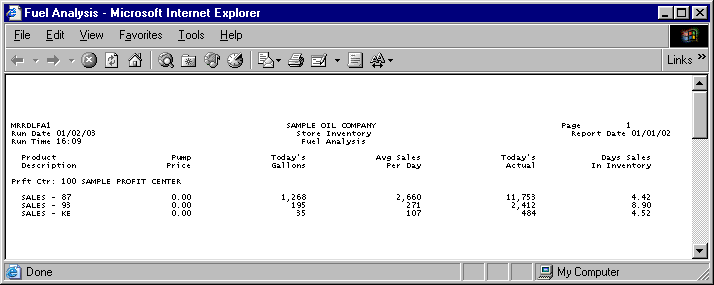
Values on the Fuel Analysis report are rounded to the nearest whole number, except for values in the Pump Price and Days Sales In Inventory columns where figures are rounded to two (2) places after the decimal.
The following information is listed on Fuel Analysis reports:
Pump Price
Today's Gallons
Avg Sales Per Day
Today's Actual
Days Sales in Inventory
Profit Center
Fuel Description
Note: The table TANKS is used to retrieve fuel sales data.
The report columns are as follows:
Pump Price
The Pump Price column displays the pump price value reported for the corresponding product on the specified date. Pump Price values are calculated by using the following formula:
X / Y
X = the sum of all selling price records retrieved from the Tanks table. Note: Selling Price records are retrieved by the system and are not displayed on Fuel Analysis reports.
Y = the number of selling price records retrieved. Note: The number of records is calculated by the system and is not displayed on Fuel Analysis reports.
Today’s Gallons
The Today’s Gallons column displays the total gallons sold for the profit center on the specified date.
Average Sales Per Day
The Average Sales Per Day column displays the average number of gallons sold a day for the fuel product through a seven day period.
Today’s Actual
The Today’s Actual column displays the sum of actual gallons for the fuel product on the specified date. Values are retrieved from stick gallon records in the TANKS table.
Days Sales In Inventory
The Days Sales In Inventory column displays the number of days in inventory the profit center has for the specified date. Days Sales in Inventory values are calculated by using the following formula:
X / Y
X = the value in the Today’s Actual column.
Y = the corresponding value in the Avg Sales Per Day column.
Days sales In Inventory values are calculated using the rounded values displayed on the Fuel Analysis report.
The following sections are listed on the report:
Profit Center
The report displays the name and number of the profit center represented by the corresponding report data.
Fuel Description
The Fuel descriptions describe the fuel products listed on the report. Products are listed in alphabetical order.
You may notice a slight rounding difference between totals on detail and summary reports. Click here to see why.