The Build Consolidation Table Processing Program accumulates and stores dollar and quantity amounts for a specified consolidation path, series, and period. This processing program accumulates and stores data in the Consolidation Table and prints a processing report.
The program accumulates data from the General Ledger and General Ledger Gallon tables. When constructing consolidated data, ExecuTrak starts with the lowest level profit center in a path and ends with the highest level profit center in the path. You should run this program once monthly after all posting is complete for the period.
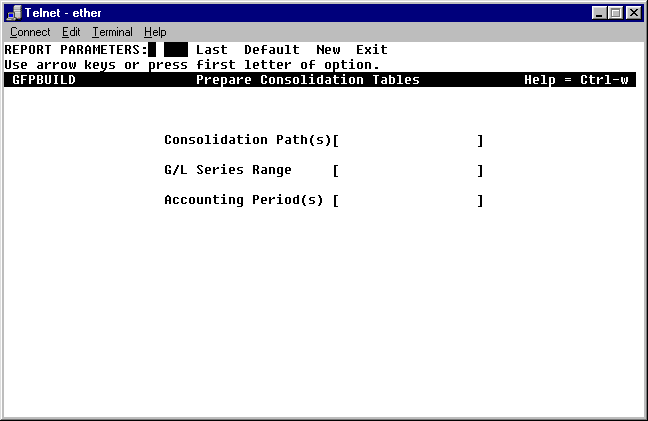
Important: Since the Prepare Units Summary processing program populates the General Ledger Gallon Table, be sure to Prepare Units Summary before you build the consolidation table. To access the program, Telnet to ExecuTrak and select Advanced Financial >> End of Period Processing >> Build Consolidation Table. The system displays the following screen.
As you can see, this screen lists three processing criteria:
Consolidation Path(s): Enter the path code(s) for which you need to build consolidated data.
G/L Series Range: Enter the series range for which you need to build consolidated data for this path.
Accounting Period(s): Enter the period for which you need to build consolidated data for this path and series.
When you accept the processing criteria, ExecuTrak allows you to specify print options. The program then builds consolidated dollar and unit data for the path and prints a processing report.
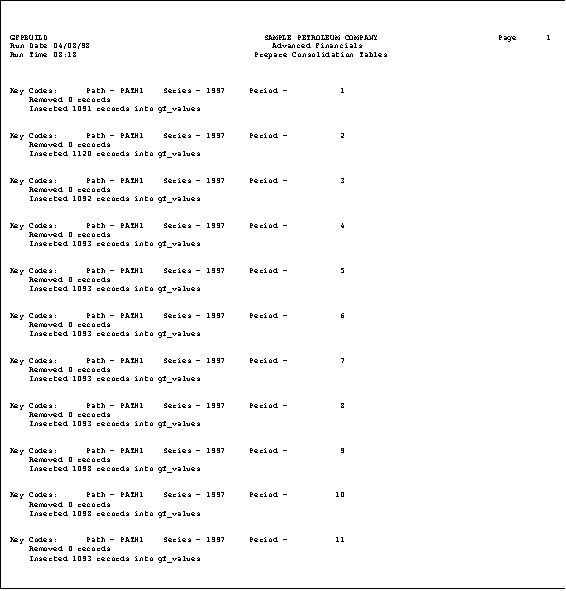
This report provides you with a listing of the number of records removed from and inserted into the consolidation table for the specified path, period, and series.