Login to DataTrak as Admin.
Click the Maintenance button on the menu. The system displays the maintenance screen.
Click the User Group Maintenance folder in the Maintenance Library tree (located in the left browser pane).
The right browser
pane displays the User Group Maintenance form. Fields on this form include
the following:
User Group Description: enter "Customers" as the user
group description.
Parent User Group: Select "Admin" from the Parent
User Group dropdown list
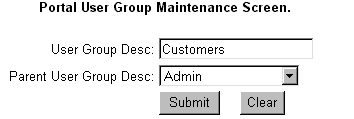
Click the Submit button to save the user group.