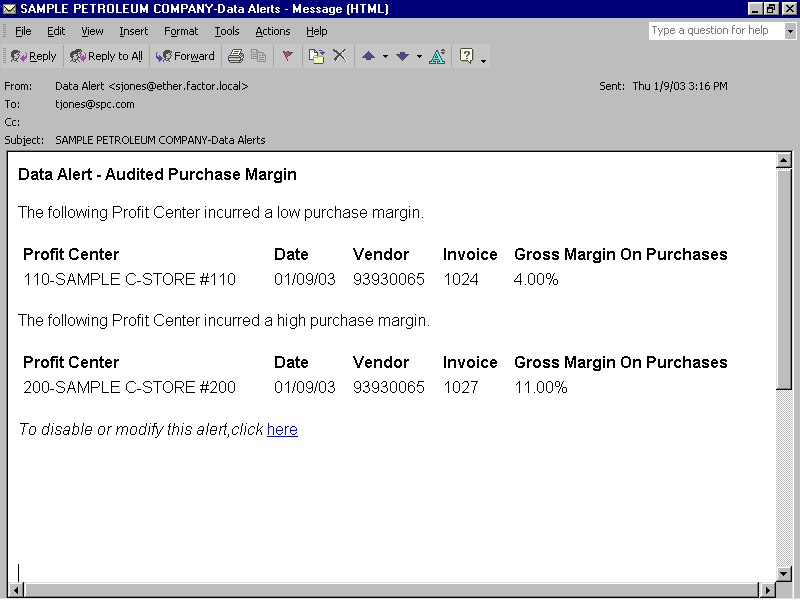
The Audited Purchase Margin data alert reports store purchases entered through merchandise receiving where the actual calculated margin exceeds the acceptable margins that are defined for the purchase group. For example, you have defined "CHIPS" as a purchase group for the C-Store category "GROC". The purchase group definition for CHIPS specifies a minimum margin of 10 percent and a maximum margin of 30 percent. Therefore a margin of 10 to 30 percent, inclusive, is acceptable for the CHIPS purchase group.
Continuing with the previous example, you set the data alert tolerances as follows:
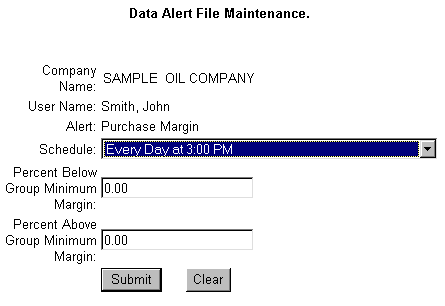
Percent Below Group Minimum Margin: 2
Percent Above Group Maximum Margin: 5
With these tolerances you will receive a data alert when the gross profit margin drops below 8 percent (defined minimum margin of 10 percent minus 2 percent tolerance equals 8 percent). You will also receive an alert if the maximum margin exceeds 35 percent (defined maximum margin of 30 plus a tolerance of 5 percent equals 35 percent).
If you set the tolerance amount to "0", then alerts will be sent whenever the margin deviates from the margin defined in the purchase group master record. In the previous example, data alerts would be sent when the maximum margin exceeds 35 percent and the minimum margin exceeds 10 percent.
See the following sample Data Alert File Maintenance form:
When scheduling the alert, it's important to remember that the Shift Report Processing program initiates the Data Alert Processor, which in turn creates this alert. This is important to remember because if you schedule the alert for once a day at a time prior to processing shift reports, you will not receive the alert until the following day. For example, you schedule the alert for 8:00 a.m. every day, but you do not process shift reports until 10:00 am. In this situation, you would not receive the alert until 8:00 a.m. the following morning. Consider using the following scheduling options to avoid this delay:
Schedule the alerts to occur for sometime after you process shift reports. This option will prove the most efficient if you process shift reports once a day after all shift reports have been received.
Schedule the alert to occur twice daily after you process shift reports, once in the morning and again in the afternoon. This option proves beneficial if you normally process all shift reports at one time, but may occasionally have one or reports that are not received or processed until later.