Viewing Management Reports
Complete the following steps to view and/or print Management
reports:
Click
the document link on your desktop. If your username is set up to
access more than one company database, the system will prompt you to select
the appropriate database.
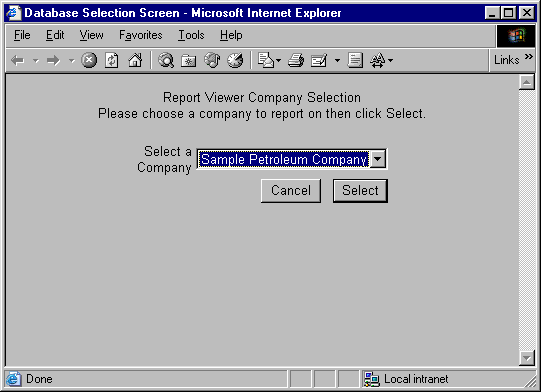
Select the database from the dropdown menu. You may only select
a database to which you have been granted access. If you do
not have access to the selected database, you will be given an access
privilege error message.
Click the Cancel button to return to the Login screen, or click the
Select button to continue.
The
system displays the Report Criteria screen. This screen allows you
to define selection criteria as well as how to view and/or print the selected
report. Review the following sample Report Criteria screen:
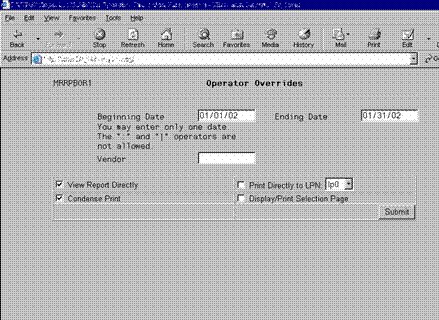
Note: The above illustration depicts the Report Criteria screen
for the Operator Overrides report. This illustration is for example
only. The Report Criteria screen will vary depending upon which
report you select.
Notice that in Figure 2, the following
selection criteria fields are available:
·
Beginning Date
·
Ending Date
·
Vendor
These fields are used to limit the information included
on the report. For example, by entering a specific vendor in the
Vendor field, you can print an Operator Overrides report with information
pertaining to only that one vendor. Note: The report criteria
will vary, depending upon the selected report.
The Windows report feature enables
you to select how to view and/or print report information:

Specify whether to view or print the report by selecting one of the
following options:
·
View Report Directly
·
Condense Print
·
Print Directly to LPN
·
Display/Print Selection Page
View Report Directly Check Box
Select the View Report Directly check box to open the
report on the PC’s desktop with your web browser.
Condense Print Check Box
Select the Condense Print check box to condense the report
so that it fits completely within the browser window. This allows
you to view all of the information on the screen without having to use
scrollbars. Condensed print is also used for ensuring that the report
prints correctly on paper. Review the following sample report as displayed
in Condense Print format:
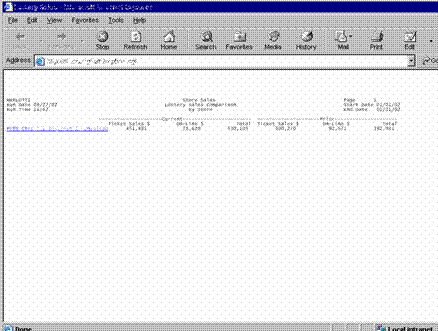
Note: The above illustration depicts the condensed
print format for the Lottery Sales summary report.
Print Directly to LPN Check Box
The Print Directly to LPN check box enables you to specify
to which network printer the report will print. Select a printer
from the dropdown menu list. When you generate the report, the system
will automatically send it to the printer you specify.
Display/Print Selection Page Check Box
The Display/Print Selection Page check box allows you
to display or print the selection criteria you entered with the report.
The selection criteria page will appear as the first page of the report.
When
you have entered all necessary information on the Report Criteria screen,
click the Submit button to view and/or print the report. Review
the following sample report:
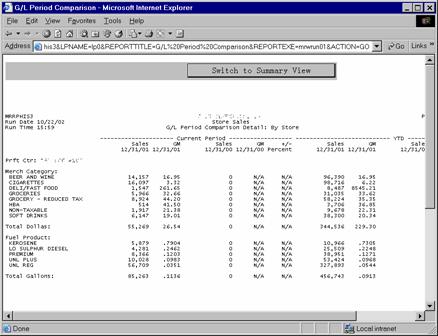
Note: The above illustration depicts the GL Period Comparison
Detail report. Notice the  button at the top
of the above report.
button at the top
of the above report.
Profit center reports may be viewed in either Summary or Detail format
(if Detail reports are available). For parent profit center reports,
the system defaults to the Summary view and will print and/or allow you
to view summary report information.
Click the  button to view parent profit center
Detail reports.
button to view parent profit center
Detail reports.
Profit Center Hyperlinks
Notice that the sample report contains a hyperlink (denoted
by the blue, underlined text). You can click on the hyperlink to
"drill down" into the report to see a closer view of the data.
Your ability to view drill down reports is dependent
upon two factors:
The structure of the path.
Consolidation paths are used to
create a Parent-Child relationship between profit centers and establish
the drill down structure for reporting. The management of your company
will define the path to use for drill down reporting in your organization.
The assigned profit center for
the username. When user accounts are created, each user is assigned
to a profit center. User's can drill down to only those profit centers
that are located lower in the path than their profit center and cannot
view those profit centers that exist higher in the path than their profit
center.