Twelve Month Profit & Loss reports allow users to compare profit and loss data for a selected month with data from up to twelve prior months. The report provides profit and loss information for the entire fiscal year, and because it uses the Advanced Financial Line Control, users can format the report as desired.
Reports are available for assigned profit centers.
Note: You will need to set up this report as a line control report using the ExecuTrak Line Control Maintenance program on the Advanced Financial File Maintenance menu. For more information see ExecuTrak Operations Manual, Volume 12.
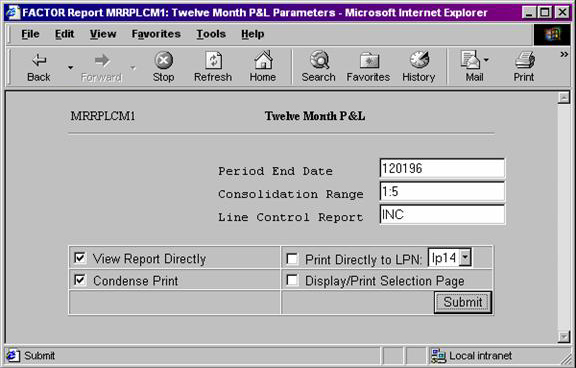
When you select Twelve Month Profit & Loss reports, the system displays the following report criteria screen:
Click the report you wish to view to highlight it, and then click the select button.
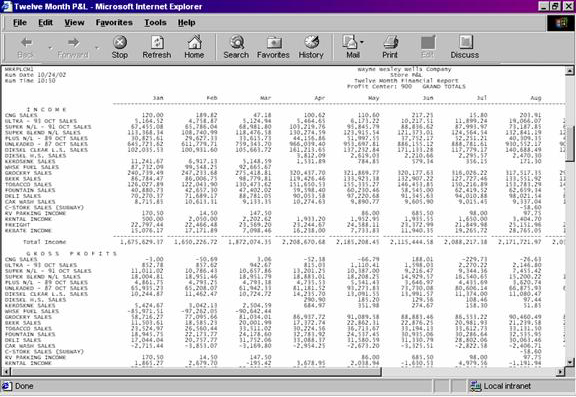
Twelve Month Profit & Loss report rows need to be set up using the Advanced Financial Line Control Maintenance program. This program allows you to specify the information to print on each line of the report. See the ExecuTrak Operations Manual, Volume 12 for information on how to use the Line Control Maintenance program.
Note: Twelve Month Profit & Loss reports contain a large number of columns. Because of this, “green bar” (11 x 14 x 7/8) paper is recommended.
Twelve Month Profit & Loss reports display values for up to twelve months at the primary profit center. Year-to-Date information is also included on the report.
You may notice a slight rounding difference between totals on detail and summary reports. Click here to see why.