The following section contains information about system parameter settings specific to DataTrak. The majority of system parameters are set up with default values that simply require you to replace the default values with the values applicable to your organization.
DataTrak uses the following system parameters.
16000--Profit center path that the Consolidate Retail Sales Data program will use.
16001--Number of periods to include in the consolidation build. The default value for this parameter equals 2. Modify this parameter only if you want to include more than 2 periods in the consolidation.
16002--This parameter is system maintained and stores the date and time of the last consolidation build. Each time the Consolidate Retail Sales Data program runs, the system updates the date and time in this parameter.
16003--This parameter lets you specify when to identify consolidated sales data as "stale".
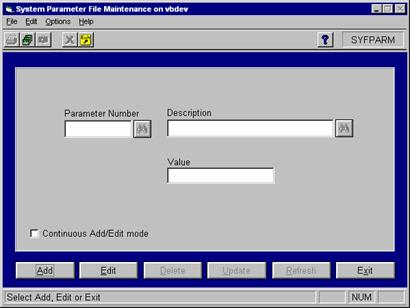
To add and/or set system parameters, select System Management >> File Maintenance >> System Parameters.
Click the Add button to add new system parameters. Click the Edit button to edit existing system parameters. When you are finished adding and/or editing, click the Update button to save the changes.
If you need to add a system parameter, complete the following steps:
1. Click the Add button.
2. Enter the Parameter Number, Description, and Value.
3. Click the Insert button.
4. Repeat steps 1 through 3 for each parameter.
DataTrak requires utilizes the following system parameters:
System Parameter 1006 lets you specify whether or not to include tax in cost layers. Set the parameter as follows:
Parameter Number: 1006
Description: Include Tax in Cost Layer
Value: N
Setting the value to "N" will ensure that there are no taxes in the fuel cost layers that need to be removed for calculation and presentation purposes.
System Parameter 16000 identifies the profit center path that DataTrak will use for drill down reporting. Profit center paths are created in the ExecuTrak Advanced Financial Module's Path File Maintenance Program. Set System Parameter 16000 as follows:
Parameter Number: 16000
Description: MR Profit Ctr Path
Value: [path code]
System Parameter 16001 specifies the number of periods for the Consolidate Retail Sales Data program to include when it consolidates sales data. The consolidation will include sales data for the number of periods identified in the value of this parameter through the date entered in the selection criteria screen. The default value for this parameter is "2". Set the parameter as follows:
Parameter Number: 16001
Description: "Periods for mrvbldr"
Value: [number of periods to include]
System parameter 16002 is system maintained. There is no need to change the value of this parameter.
This parameter lets you specify when to identify consolidated sales data as "stale". When the consolidation program runs, it first checks the value of system parameter 16002 to see the last time data was consolidated. The program then compares that to the current date and time. If the difference is less than the number of hours stored in this parameter, the program will not consolidate sales data. If the difference exceeds the value of this parameter, then program continues with the consolidation. The default value for this parameter is 12; you can change the value if necessary.
Parameter Number: 16003
Description: "Hours needed to rerun MRVBLDRS"
Value: [number of hours]