The Retail Fuel Profit Analysis Report uses period-to-date fuel profit information to project and summarize fuel profit through the end of the specified period. Reports include period-to-date data, remaining sales, and projections for fuel sales.
Reports are available in summary and detail formats for assigned profit centers.
Note: Retail Period Profit Analysis reports are generated offline. This report should be generated on a monthly basis after posting is complete for the month. This offline report can be generated manually or the DataTrak Administrator can define the generation of this report as an "event" and let the scheduler create the report.
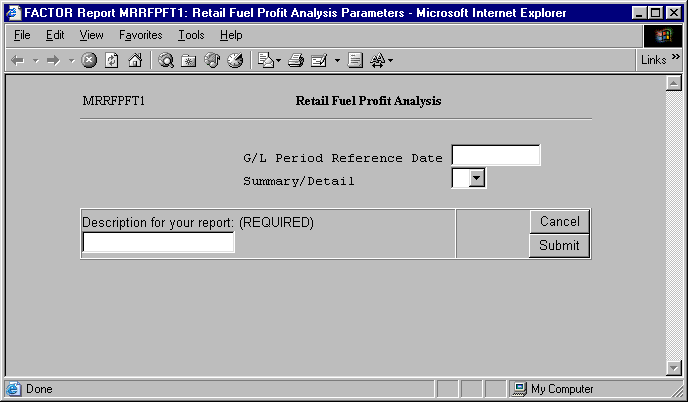
When you select Retail Fuel Profit Analysis reports, the system displays the following report criteria screen:
Click the report you want to view to highlight it. Then, click the select button.
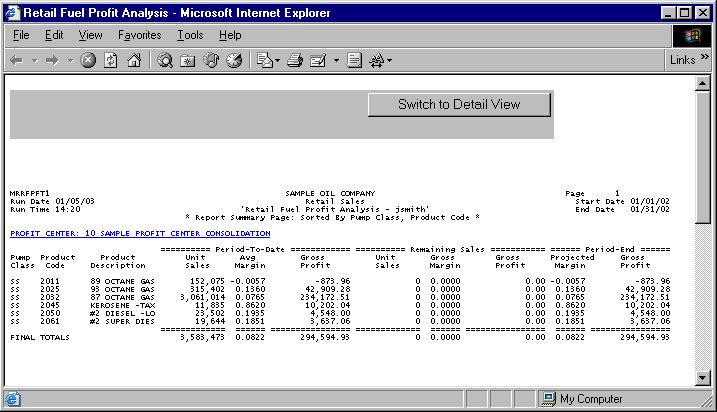
The following information is listed on Retail Fuel Profit Analysis reports:
Period-To-Date
Remaining Sales
Period End
Product Code
Product Name
Last Sales Date
Unit Sales
Average Cost
Average Retail
Average Margin
Gross Profit
Current Retail
Gross Margin
Projected Margin
Profit Center
Profit Center Totals
Final Totals.
The columns beneath the Period-To-Date heading display information relating to the selected period through the date entered as report criteria.
The following columns are reported underneath the Period-to-Date heading:
Unit Sales
Average Cost
Average Retail
Average Margin
Gross Profit
Unit Sales
The Unit Sales column displays the total number of units sold for the corresponding fuel product from the beginning of the period through the date in the Last Sales Date column. Note: The Last Sales Date is the last date shift reports were entered and processed.
Average Cost
The Average Cost column displays the average FIFO cost of the units listed in the Unit Sales column. This number represents a weighted average of all costs paid for the product.
Average Retail
The Average Retail column displays the average retail price for the fuel product sold from the beginning of the period through the date in the Last Sales Date column.
Average Margin
The Average Margin column displays the average margin value calculated by the following formula:
X – Y
X = the Period-to-Date: Average Retail column value.
Y = the Period-to-Date: Average Cost column value.
Gross Profit
The Gross Profit column displays the Gross Profit value calculated by the following formula:
X * Y
X = the Period-to-Date: Unit Sales column value.
Y = the corresponding Period-to-Date: Average Margin column value.
The columns beneath the Remaining Sales heading display projected values for the remaining selected period.
The following columns are reported underneath the Remaining Sales heading:
Unit Sales
Current Retail
Gross Margin
Gross Profit
Unit Sales
The Unit Sales column displays the projected total number of units that will sell from the Last Sales Date through the end of the period.
Current Retail
The Current Retail column displays the retail pump price for the fuel product on the Last Sales Date.
Gross Margin
The Gross Margin column displays the gross margin value calculated by the following formula:
X – Y
X = the Remaining Sales: Current Retail column value.
Y = the corresponding Period-to-Date: Average Cost column value.
Gross Profit
The Gross Profit column displays the Gross Profit value calculated by the following formula:
X * Y
X = the Remaining Sales: Unit Sales column value.
Y = the corresponding Remaining Sales: Gross Margin column value.
The columns beneath the Period End heading display projected margin and gross profit values for the selected period.
The following columns are reported underneath the Period End heading:
Projected Margin
Gross Profit
Projected Margin
The Projected Margin column displays the projected margin value calculated by the following formula:
X / (Y +Z)
X = the Period End: Gross Profit column value.
Y = the corresponding Period-to-Date: Unit Sales column value.
Z = the corresponding Remaining Sales: Unit Sales column value.
Gross Profit
The Gross Profit column displays the Gross Profit value calculated by the following formula:
X + Y
X = the Period-to-Date: Gross Profit column value.
Y = the corresponding Remaining Sales: Gross Profit column value.
The following sections are listed on the report:
Profit Center
Retail Fuel Profit Analysis reports print information for assigned profit centers.
Fuel Product Code
The Fuel Product Code column displays the code associated with the fuel product at the profit center.
Fuel Product Name
The Fuel Product Name column displays the name associated with the Fuel Product Code.
Last Sales Date
The Last Sales Date column displays the last date shift reports were entered and processed at the profit center.
Profit Center Totals
The Profit Center Totals section displays total column values for each profit center.
Profit Center Totals for the Unit Sales and Gross Profit columns are calculated by summing the column values for each profit center.
Final Totals
The Final Totals section displays the sum of all Profit Center Total column values.
Final Totals for the Unit Sales and Gross Profit columns are calculated by summing all Profit Center Total values.
The Retail Fuel Profit Analysis Detail report gives you more detailed information for the data reported on the Summary report.
Many of the values on the Detail report are rounded. Because of this rounding, figures may differ from the Summary report, which should be considered more accurate.
The following information is listed on Retail Fuel Profit Analysis Detail reports:
Period-To-Date
Remaining Sales
Period End
Product Code
Product Name
Last Sales Date
Unit Sales
Average Cost
Average Retail
Average Margin
Gross Profit
Current Retail
Gross Margin
Projected Margin
Profit Center
Profit Center Totals
Final Totals
As on the Summary report, the columns beneath the Period-To-Date heading display information relating to the selected period through the date entered as report criteria.
The following columns are reported underneath the Period-to-Date heading:
Unit Sales
Average Cost
Average Retail
Average Margin
Gross Profit
The Period-to-Date columns are calculated in the same manner as on the Summary report. See the Retail Fuel Profit Analysis Summary report section for more information.
As on the Summary report, the columns beneath the Remaining Sales heading display projected values for the remaining selected period.
The following columns are reported underneath Remaining Sales heading:
Unit Sales
Current Retail
Gross Margin
Gross Profit
The Remaining Sales columns are calculated in the same manner as on the Summary report. See the Retail Fuel Profit Analysis Summary report section for more information.
As on the Summary report, the columns beneath the Period End heading display projected margin and gross profit values for the selected period.
The following columns are reported underneath the Period End heading:
Projected Margin
Gross Profit
The Period End columns are calculated in the same manner as on the Summary report. See the Retail Fuel Profit Analysis Summary report section for more information.
The following sections are listed on the report:
Profit Center
Fuel Profit Analysis reports print information for all assigned profit centers.
Fuel Product Code
The Fuel Product Code column displays the code associated with the fuel product at the profit center.
Fuel Product Name
The Fuel Product Name column displays the name associated with the Fuel Product Code.
Last Sales Date
The Last Sales Date column displays the last date shift reports were entered and processed.
Profit Center Totals
The Profit Center Totals section displays total column values for each profit center.
Profit Center Totals for the Unit Sales and Gross Profit columns are calculated by summing the column values for each profit center.
Final Totals
The Final Totals section displays the sum of all Profit Center Total column values.
Final Totals for the Unit Sales and Gross Profit columns are calculated by summing all Profit Center Total values.
You may notice a slight rounding difference between totals on detail and summary reports. Click here to see why.