PLU Analysis reports present sales units, sales dollars, and markup/markdown information for each PLU number at assigned profit centers.
Reports display summary information for assigned profit centers.
Note: This report is unavailable if you use scanning.
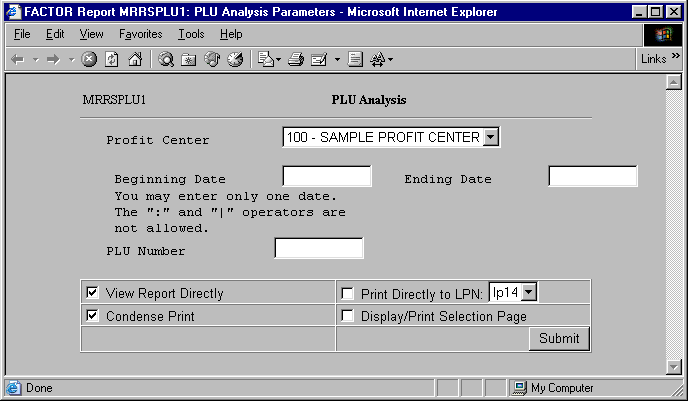
When you select PLU Analysis reports, the system displays the following report criteria screen:
The following selection criteria allow you to specify the information you want displayed on the report and the way the report is viewed.
Enter the starting date for which you want to begin viewing PLU information. Use the mm/yy/dd format. For example:
1/01/99
Enter the ending date for the PLU information. Use the mm/dd/yy format. For example:
01/30/99
Note: If the Beginning and Ending date fields are left blank, the system will default to current system date.
Enter the PLU number you want reported. If you want to report information for all PLU numbers, leave the field blank.
You may specify how you want to view and/or print the report by choosing from the following selections:
· View Report Directly
· Condense Print
· Print Directly to LPN
· Display/Print Selection Page
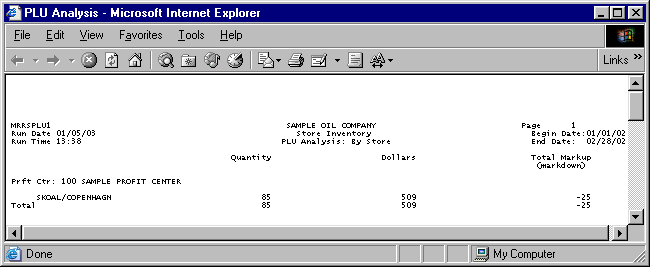
The following information is listed on PLU Analysis reports:
Quantity
Dollars
Total Markup (markdown)
Profit Center
PLU Description
Total
Note: The table named PLUS is used to retrieve PLU data.
The report columns are as follows:
Quantity
The Quantity column displays the total quantity values being reported for the corresponding PLU number at the identified profit center.
Dollars
The Dollars column displays the sum of dollar values being reported for the corresponding PLU number at the identified profit center.
Total Markup (markdown)
Total Markup (markdown) values are calculated by using the following formula:
(X – Y)
X = the sum of price markup records from the PLUS table for the PLU number. Note: Markup records are retrieved by the system and are not displayed on PLU Analysis reports.
Y = the sum of price markdown records from the PLUS table for the PLU number. Note: Markdown records are retrieved by the system and are not displayed on PLU Analysis reports.
The following sections are listed on the report:
Profit Center
The report displays the name and number of the profit center represented by the corresponding report data.
PLU Description
The PLU description describes the PLU number being reported.
Totals
Total values are figured by summing all corresponding column values.
Totals are calculated using the rounded values displayed on the PLU Analysis report.
You may notice a slight rounding difference between totals on detail and summary reports. Click here to see why.