Period Performance Statistics reports allow users to compare the current period performance of a profit center with the performance of twelve prior periods. This information can be used to help spot trends in areas vital to store operations.
Note: Please consider the following in regards to Period Performance Statistic reports:
If you use the Time N Attendance method for recording payroll, Factor cannot guarantee that the Regular and Overtime hours listed on the Period Performance Statistics report are accurate.
The Labor section – Total $ calculation will only be available if the Factor Payroll module is used.
The % Shrink to Sales calculation will only be available if inventory adjustments are made through StoreTrak and the user has activated the custom inventory update program. (See the Automatic Inventory Adjustment section for more information).
The Average $ Per Hour calculation will assume that the store is open 24 hours a day.
Reports are available for both parent and child profit centers.
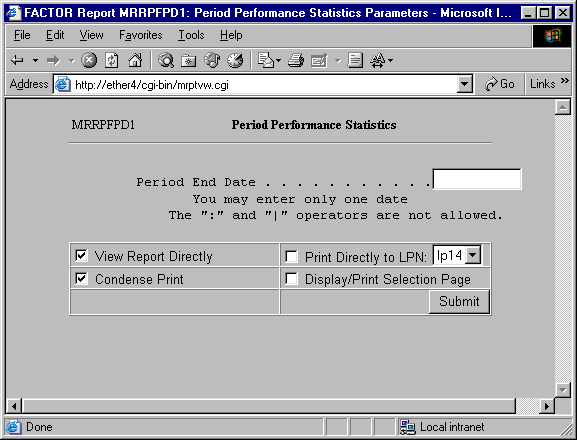
When you select Period Performance Statistics reports, the system displays the following report criteria screen:
The following selection criteria allow you to specify the information you want included on the report and the way the report is viewed.
Enter the ending date for the period you wish to view. You must make an entry in this field and it must be in mm/dd/yy format. For example:
01/10/99
Note: You do not need to know the exact Period End Date. The system will find the actual ending date for the period for any date you enter.
You may specify how you want to view and/or print the report by choosing from the following selections:
· View Report Directly
· Condense Print
· Print Directly to LPN
· Display/Print Selection Page
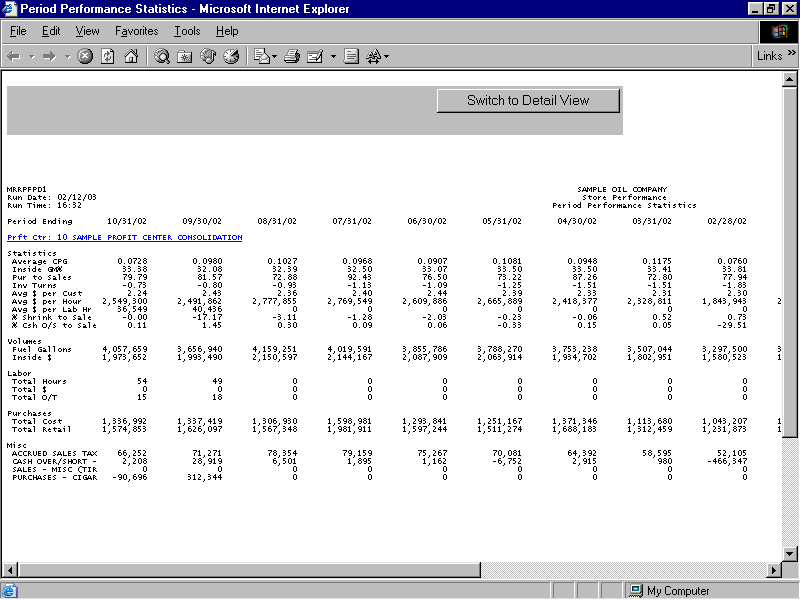
The following information is listed on Period Performance Statistics reports:
Period Ending Date
Profit Center
Statistics
Volumes
Labor
Purchases
Miscellaneous
Note: Table MR_SALES is used to retrieve sales and profit data. Purchase data is retrieved from RS_PURCLINE. Inventory data is retrieved from RS_CAT_DET. REGMISC is used to determine the number of customers and TOTALS is used to retrieve customer count information. Labor Hours are retrieved from the TIME_N_ATTEND and WFMS_DIST_HOURS tables. Miscellaneous and shrink values are retrieved from GL_JRNL_RS.
The report columns are as follows:
Period Ending Date
The Period Ending Date columns contain data pertaining to the specified date. The first Period Ending Date is the date entered through the Selection Criteria screen. Each subsequent Ending Date represents a prior period.
Note: Thirteen periods are depicted on the Period Performance Statistic report. Prior periods are chosen by subtracting one month from the selected Period Ending date, and then subtracting one month from each subsequent Period Ending Date.
If there are prior periods where no data exists, the program will display either a zero (0) or N/A in the field.
The report displays the name and number of the profit center represented by the corresponding report data.
If a profit center has a child profit center, it appears as a hyperlink. Clicking on the hyperlink allows you to view summary information for child profit center(s).
Report data is organized into the following five sections:
Statistics
Volumes
Labor
Purchases
Miscellaneous
Statistics data is analyzed and presented in regards to the following information:
Average CPG
Inside GM %
Purchases To Sales
Inventory Turns
Average $ Per Customer
Average $ Per Hour
Average $ Per Labor Hour
% Shrink To Sales
% Cash Over/Short To Sales
Statistics – Average CPG
The Statistics – Average CPG column reports average cents-per-gallon margin values for fuel products during the specified period.
Average CPG (cents per gallon) column values are calculated by using the following formula:
Y / X
X = the cumulative sales values for fuel products sold during the specified period.
Y = the cumulative gross profit values for the fuel products sold during the specified period. Note: Gross profit values are retrieved and calculated by the system. They are not displayed on Period Performance Statistics reports.
Values are rounded to four (4) places after the decimal.
Statistics – Inside GM %
The Statistics – Inside GM % column reports gross margin percentage values for the merchandise products sold during the specified period.
Inside GM % values are calculated by using the following formula:
(Y / X ) * 100
X = the cumulative sales values for the merchandise products sold during the specified period.
Y = the cumulative gross profit values for the merchandise products sold during the specified period. Note: Gross profit values are retrieved and calculated by the system. They are not displayed on Period Performance Statistics reports.
Values are rounded to two (2) places after the decimal.
Statistics – Purchases To Sales
The Statistics – Purchases to Sales column reports the percentage of purchases compared to sales for the specified period.
Purchases to Sales values are calculated by using the following formula:
(X / Y) * 100
X = the cumulative merchandise purchase values for the specified period. Note: Purchase values are calculated and retrieved by the system. They are not displayed on Period Performance Statistics reports.
Y = the cumulative merchandise sales values for the specified period.
Values are rounded to two (2) places after the decimal.
Statistics – Inventory Turns
The Statistics – Inventory Turns column reports the inventory turnover ratio for the specified period.
Inventory Turns values are calculated by using the following formula:
X / Y
X = the cumulative merchandise sales for the specified period.
Y = the corresponding beginning inventory value for the specified period. Note: Beginning inventory values are calculated and retrieved by the system. They are not displayed on Period Performance Statistics reports.
Values are calculated on a monthly basis and are rounded to two (2) places after the decimal.
Statistics – Average $ Per Customer
The Statistics – Average $ per Customer column reports the average dollar amount spent per customer during the specified period.
Average $ per Customer values are calculated by using the following formula:
X / Y
X = the cumulative merchandise sales for the specified period.
Y = the number of customer records retrieved by the system for the specified period.
Values are rounded to two (2) places after the decimal.
Statistics – Average $ Per Hour
The Statistics – Average $ per Hour column reports the average dollar amount received per hour for the specified period.
Average $ per Hour values are calculated by using the following formula:
(X / 24N)
X = the cumulative merchandise sales for the specified period.
N = the number of days in the specified period.
Note: The Average $ per Hour formula assumes that the store is open 24 hours a day.
Values are rounded to two (2) places after the decimal.
Statistics – Average $ Per Labor Hour
The Statistics – Average $ per Labor Hour column reports the average dollar amount received per labor hour for the specified period.
Average $ per Labor Hour values are calculated by using the following formula:
X / Y
X = the cumulative merchandise sales for the specified period.
Y = the sum of all regular and overtime hours for the specified period.
Values are rounded to the nearest whole number.
Statistics – % Shrink to Sales
The Statistics – % Shrink to Sales column reports the percent of shrink (change in cost) compared to sales for the specified period.
% Shrink to Sales values are calculated by using the following formula:
(X / Y) * 100
X = the shrink value for the specified period. Note: Shrink values are retrieved and calculated by the system. They are not displayed on Period Performance reports.
Y = the cumulative merchandise sales for the specified period.
Values are rounded to two (2) places after the decimal.
Statistics – % Cash Over/Short to Sales
The Statistics – % Cash O/S to Sales column reports the percentage of cash over/short values compared to sales for the specified period.
% Cash O/S to Sales values are calculated by using the following formula:
(X \ Y) * 100
X = the over/short value for the specified period. Note: Over/Short values are retrieved and calculated by the system. They are not displayed on Period Performance reports.
Y = the cumulative merchandise sales for the specified period.
Values are rounded to two (2) places after the decimal.
Volumes data is analyzed and presented in regards to the following information:
Fuel Gallons
Inside $
Volumes – Fuel Gallons
The Volumes – Fuel Gallons column reports fuel gallon volume values for the specified period. Values are rounded to the nearest whole number.
Volumes – Inside $
The Volumes – Inside $ column reports merchandise sales volume values for the specified period. Values are rounded to the nearest whole number.
Labor data is analyzed and presented in regards to the following information:
Total Hours
Total $
Total Overtime
Labor – Total Hours
The Labor – Total Hours column reports the sum of all regular and overtime hours for the specified period. Values are rounded to the nearest whole number.
Labor – Total $
The Labor – Total $ column reports the sum of all regular and overtime pay for the specified period. Values are rounded to the nearest whole number.
Labor – Total Overtime
The Labor – Total O/T column reports the sum of all overtime hours. Values are rounded to the nearest whole number.
Purchase data is analyzed and presented in regards to the following information:
Total Cost
Total Retail
Purchases – Total Cost
The Purchases – Total cost column reports the sum of all purchase costs for the specified period. Values are rounded to the nearest whole number.
Purchases – Total Retail
The Purchases – Total Retail column reports the sum of all retail purchases for the specified period. Values are rounded to the nearest whole number.
The Miscellaneous section of the report details the store’s miscellaneous revenue values for the specified periods. The report lists a row for each Miscellaneous Revenue category available (if any). Values are rounded to the nearest whole number.
If a profit center has child profit centers, you may click on the parent profit center’s hyperlink on the Period Performance Statistics report to view report information for its child profit centers.
The Period Performance Statistics child report is based on the same selection criteria you entered for the parent profit center.
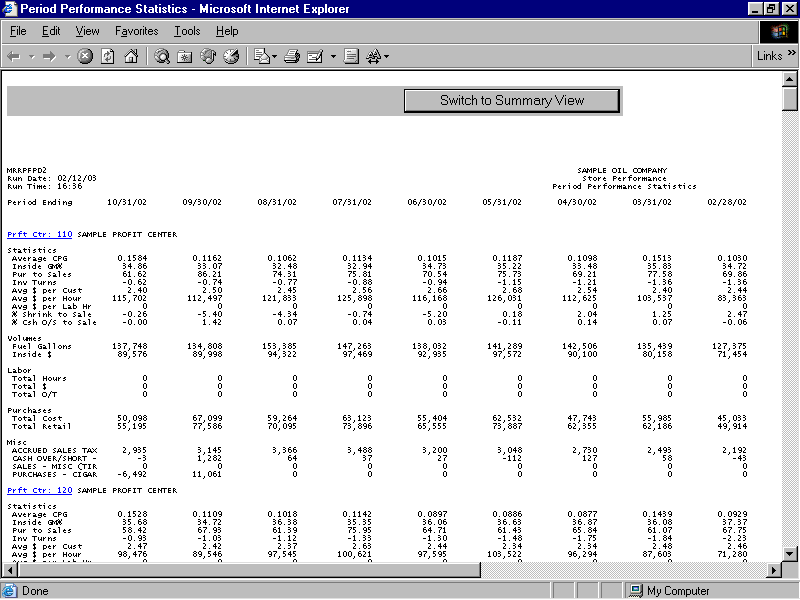
Information for child profit centers is calculated in the same manner as it is for parent profit centers. See the Period Performance Statistics Summary report section for more information.
You may notice a slight rounding difference between totals on detail and summary reports. Click here to see why.