Operator Overrides reports allow users to view all items scanned at their assigned store(s) for a selected period where a store employee changed the retail price on the point of sale register. This information can be used to review price book problems and employee procedures.
Reports are available for assigned profit centers.
Note: This report is unavailable for Gilbarco registers.
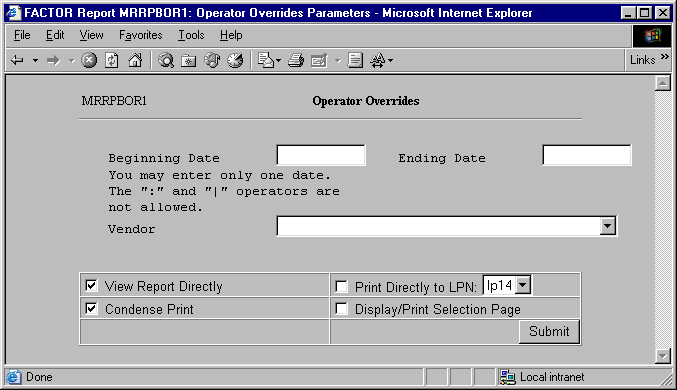
When you select Operator Overrides reports, the system displays the following report criteria screen:
The following selection criteria allow you to specify the period to report and the way the report is viewed.
Enter the starting date for the period you wish to view. You must make an entry in this field and it must be in mm/dd/yy format. For example:
01/10/99
Enter the ending date for the period you wish to view. You must make an entry in this field and the date must be greater than the Beginning Date. Use the mm/dd/yy format. For example:
01/10/99
Note: If the Ending Date is not greater than the Beginning Date, the system will display an error message.
Enter the vendor number, or use the search procedure to view a drop-down list of vendors that match the criteria you enter in the Vendor edit box, if any. You may then select the vendor by clicking the appropriate listing.
You may specify how you want to view and/or print the report by choosing from the following selections:
· View Report Directly
· Condense Print
· Print Directly to LPN
· Display/Print Selection Page
Note: Operator Overrides reports display information by store where the operator changed the retail sales price.
The following information is listed on Operator Overrides reports:
Date
Vendor Name
Item Code
Item Description
Store
Selling Price
Book Price
Difference
Note: The IQ_SCAN_DATA_HIST table is used to retrieve price book data. Table P_VENDOR is used to retrieve vendor name and table RS_B_ITEM is used to retrieve item information.
The report contains the following columns:
Date
The report displays a row for every date in the specified date range.
Vendor
The Vendor column displays the name of the vendor for which the corresponding override data pertains. If there is more than one vendor involved, the report prints “Multiple Vendors”.
Item Code
The Item Code column displays the numerical item code. The report lists items from the Beginning Date entered as report criteria through the Ending Date entered.
Item Description
The Item Description column displays the description of the corresponding item code number.
Store
Operator Overrides reports display the name of the profit center where the override occurred.
Selling Price
The Selling Price column displays the selling price of the overridden item. Values are rounded to two (2) places after the decimal.
Book Price
The Book Price column displays the price book retail price for the item. Values are rounded to two (2) places after the decimal.
Difference
The Difference column displays the amount of difference between the price book retail price and the override price of the item. Difference values are calculated by using the following formula:
X – Y
X = the value from the Book Price column for the item.
Y = the corresponding value from the Selling Price column.
Values are rounded to two (2) places after the decimal.
You may notice a slight rounding difference between totals on detail and summary reports. Click here to see why.