The Inventory Cross Reference Maintenance program lets you create cross references to define the account that will be charged for the inventory adjustment. When you create a cross reference, you attach the category code to the adjustment category code.
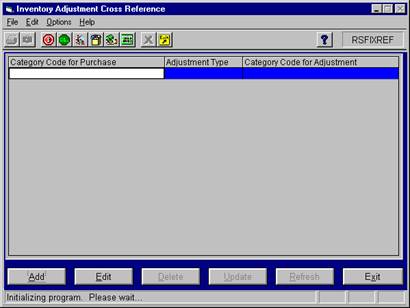
To access the program, select Retail Sales > File Maintenance > C-store Inv. Adj. X-Ref and the system displays the following screen.
To create a cross reference, click the Add button. To change an existing cross reference, click the Edit button.
In Edit mode the grid automatically displays the existing cross references. In Add mode, enter the following information to create a new cross reference:
Category Code For Purchase-Specify the C-store category code that you use for purchases. Enter the code or use the search procedure to select the code from the dropdown list.
Adjustment Type-Enter "A" if the adjustment type is from an alternate category code or enter "C" if the adjustment type is from a category code.
Category Code For Adjustment-This column lets you specify the category code for the adjustment. For type A adjustments, this column lets you enter the alternate category code or select the code from a dropdown list of alternate categories. For type C records, this column lets you enter the C-store category code or select the code from a dropdown list of C-store categories.
When you create cross references, you can reference all C-store category codes to a single adjustment category code or reference each category code to a unique adjustment category code.