Fuel Sales Comparison reports allow users to compare fuel sales data for a particular date range with sales data from the same date range one year prior.
Reports are available in summary, detail, and detail by day format for both parent and child profit centers.
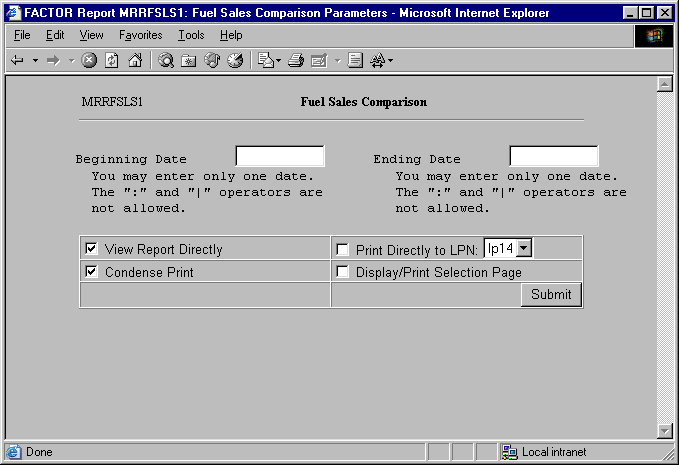
When you select Fuel Sales Comparison reports, the system displays the following Selection Criteria screen:
The following selection criteria allow you to specify the information you want included on the report and the way the report is viewed.
Enter the starting date for the period you wish to compare with the previous year. You must make an entry in this field and it must be in mm/dd/yy format. For example:
01/10/99
Enter the ending date for the period to be compared with the previous year. You must make an entry in this field and the date must be greater than the Beginning Date. Use the mm/dd/yy format. For example:
09/10/99
Note: If the Ending Date is not greater than the Beginning Date, or if the Beginning and Ending dates are not within the same GL period, the system will display an error message.
You may specify how you want to view and/or print the report by choosing from the following selections:
· View Report Directly
· Condense Print
· Print Directly to LPN
· Display/Print Selection Page
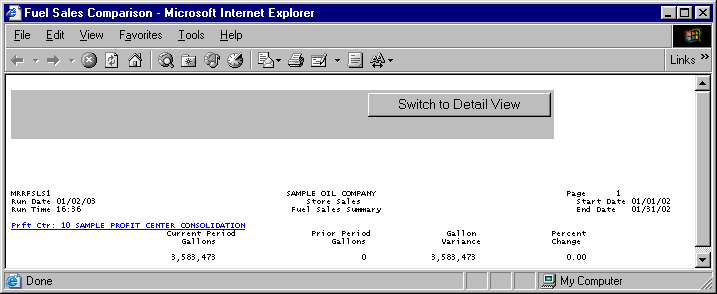
The following information is listed on Fuel Sales Comparison Summary Reports:
Profit Center
Current Period Gallons
Prior Period Gallons
Gallons Variance
Percent Change
Note: Table MR_SALES is used to retrieve fuel sales data. All values on Fuel Sales Comparison reports represent gallons.
The report displays the name and number of the profit center represented by the corresponding report data.
If a profit center has a child profit center, it appears as a hyperlink. Clicking on the hyperlink allows you to view summary report information, for each child profit center.
Note: If a primary profit center does not have a child profit center and the primary profit center summary is shown again, clicking on the primary profit center hyperlink will show detail information for the primary profit center.
The report columns are as follows:
Current Period Gallons
The Current Period Gallons column displays the sum of all fuel gallons sold during the specified period for the current year at the profit center. Values are rounded to the nearest whole gallon.
Prior Period Gallons
The Prior Period Gallons column displays the sum of all fuel gallons sold during the specified period for the previous year at the profit center. Values are rounded to the nearest whole gallon.
Gallons Variance
The following formula is used to calculate the Gallon Variance column:
(X – Y)
X = the Current Period Gallons column value.
Y = the Prior Period Gallons column value.
Variance values are rounded to whole gallons. If there are no Y values for the calculations, the report prints N/A.
Percent Change
The following formula is used to calculate the Percent Change column:
((X – Y) / Y) * 100
X = the Current Period Gallons column value.
Y = the Prior Period Gallons column value.
Values are rounded to two (2) places after the decimal. If there are no Y values for the calculations, the report prints N/A.
The Fuel Sales Comparison Detail report displays more detailed information for each section listed on the Fuel Sales Comparison Summary report.
Values on the detail report are rounded to the nearest whole gallon, or they are rounded to a specified place after the decimal. Because each value is rounded, Total values may differ from the Summary report. The Summary report should be considered more accurate.
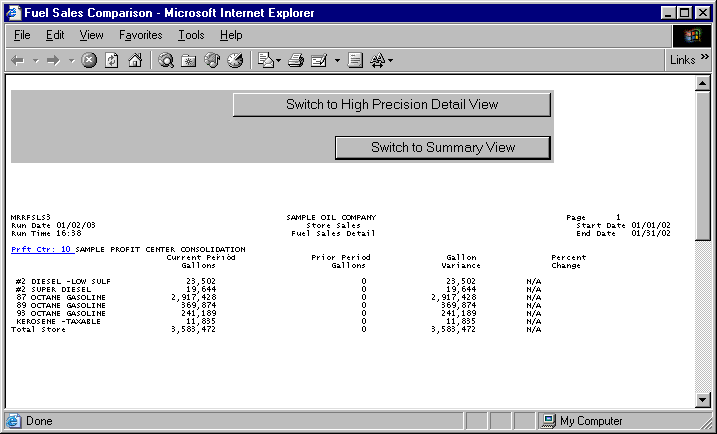
The following information is listed on Fuel Sales Comparison Detail reports:
Profit Center
Current Period Gallons
Prior Period Gallons
Gallon Variance
Percent Change
Fuel Product
Total Values
The report displays the name and number of the profit center represented by the corresponding report data.
Profit centers appear as hyperlinks on the Fuel Sales Comparison Detail report. Clicking on the hyperlink will show detail information, by day, for the selected profit center.
The report columns are as follows:
Current Period Gallons
The Current Period Gallons column displays the fuel gallons sold for each fuel category listed at the profit center during the current specified period. Total values are calculated by summing all fuel product values in the column. Values are rounded to the nearest whole gallon.
Prior Period Gallons
The Prior Period Gallons column displays the fuel gallons sold for each fuel category listed at the profit center during the previous year for the specified period. Total values are calculated by summing all fuel product values in the column. Values are rounded to the nearest whole gallon.
Gallons Variance
The following formula is used to calculate the Gallons Variance column (including the Gallons Variance Total):
(X – Y)
X = the Current Period Gallons column value (or Total value for Gallons Variance Total).
Y = the Prior Period Gallons column value (or Total value for Gallons Variance Total).
Values are rounded to whole gallons. If there are no Y values for the calculations, the report prints N/A.
Percent Change
The following formula is used to calculate the Percent Change column (including the Percent Change Total):
((X – Y) / Y) * 100
X = the Current Period Gallons column value (or Total value for Percent Change Total).
Y = the Prior Period Gallons column value (or Total value for Percent Change Total).
The following sections are listed on the report:
Fuel Product Category
The report displays the different fuel products being reported by the profit center during the specified period and year.
Unless otherwise noted, all Total columns are figured as follows:
Current and Prior Period Gallons Total values are the sum of all corresponding column listings.
Gallon Variance Total values are figured by using the following equation:
(X – Y)
X = the Current Period Gallons Total column value.
Y = the corresponding Prior Period Gallons Total column value.
Percent Change Total values are figured by using the following equation:
((X – Y) / Y) * 100
X = the Current Period Gallons Total column value.
Y = the Prior Period Gallons Total column value.
If a profit center has child profit centers, you may click on the parent profit center’s hyperlink to view summary report information for its child profit centers.
Child Fuel Sales Comparison Summary reports are based on the same selection criteria you entered for the parent profit center.
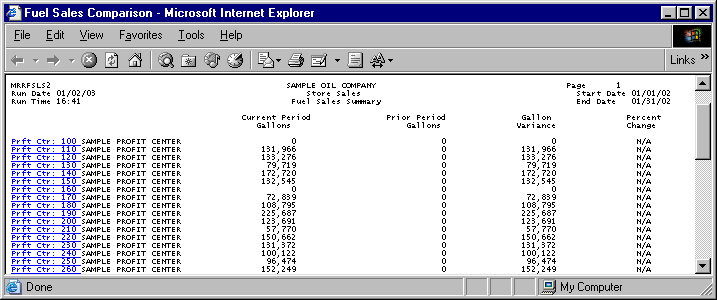
Summary information for child profit centers is calculated in the same manner as it is for parent profit centers. See the Fuel Sales Comparison Summary report section for more information.
Click on the child profit center’s hyperlink to view a Fuel Sales Comparison Child Detail report. Detail information for child profit centers is calculated in the same manner as it is for parent profit centers. See the Fuel Sales Comparison Detail report section for more information.
Click on the child profit center’s hyperlink to view a Fuel Sales Comparison Child Detail By Day report.
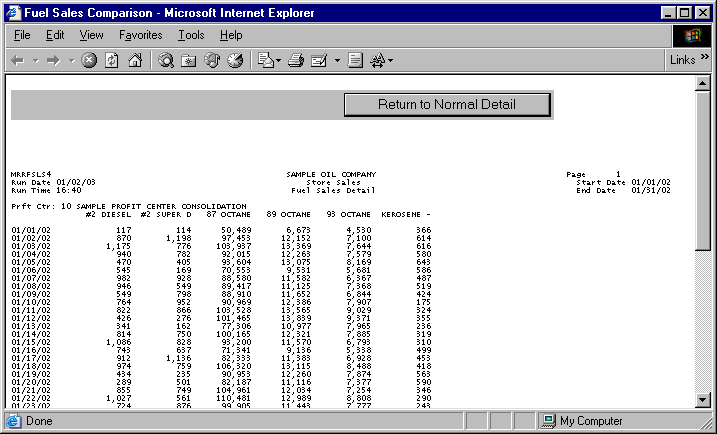
Clicking on a profit center’s hyperlink on either a parent or child Fuel Sales Comparison Detail report will allow you to view Detail By Day reports. Detail By Day reports list fuel sales information, by day, for each fuel product at the selected profit center.
Note: The values on the Detail By Day report are rounded to the nearest whole gallon, or they are rounded to a specified place after the decimal. Because each category value is rounded, Total figures may differ from Summary reports, which are to be considered more accurate.
The following information is listed on Fuel Sales Comparison Detail By Day reports:
Profit Center
Fuel product
Date of Sales
Total Store Values
The report displays the name and number of the profit center represented by the corresponding report data.
The Fuel Product columns display each type of fuel product sold at the profit center during the specified period and year.
Note: The report is limited to ten (10) Fuel product columns. If more than ten columns are available, the program selects the first ten fuel products encountered and lists them in alphabetical order from left to right.
The Date of Sales rows display sales dates for each product category. Dates begin with the Beginning Date (entered as selection criteria) and increment by one day until the Ending Date (entered as selection criteria) is reached.
The Total Store columns are calculated by summing each Fuel Product column. Values are rounded to whole gallons.
You may notice a slight rounding difference between totals on detail and summary reports. Click here to see why.