Fuel Over/Short reports provide purchase, sales, book, and actual fuel inventory information for a selected period. This information can be used to identify data which has been posted incorrectly, as well as inventory losses.
You should run the Fuel Over/Short Report on both a weekly and monthly basis. Weekly Fuel Over/Short reports prove useful for monitoring actual and estimated fuel transactions and inventory levels. Monthly Fuel Over/Short reports display actual fuel transactions and inventory levels for the month.
Reports are available in summary and detailed formats for both parent and child profit centers.
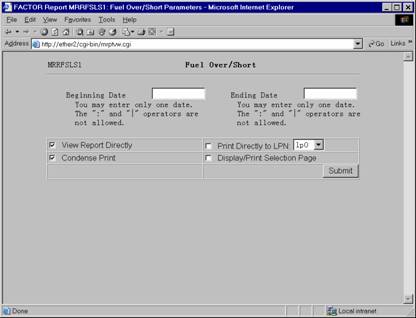
When you select Fuel Over/Short reports, the system displays the following report criteria screen:
Figure 16: Fuel Over/Short Report Criteria
The following selection criteria allow you to specify the information you want included on the report and the way the report is viewed.
Enter the ending date for the period you wish to view. You must make an entry in this field and it must be in mm/dd/yy format. For example:
01/10/99
Note: You do not need to know the exact Period End Date. The system will find the actual ending date for the period for any date you enter.
You may specify how you want to view and/or print the report by choosing from the following selections:
· View Report Directly
· Condense Print
· Print Directly to LPN
· Display/Print Selection Page
Figure 17: Sample Fuel Over/Short Summary Report
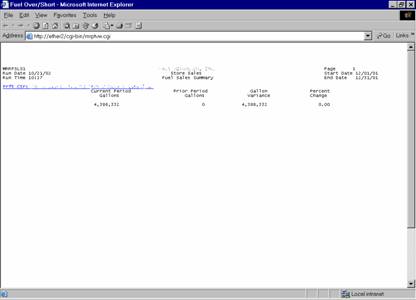
The following information is listed on Fuel Over/Short Summary reports:
Opening Gallons
PTD Actual Units Purchased
Purchased Units In Route
PTD Actual Units Sold
Closing Gallons
Stick Gallons
Over/Short
Prior PD O/S
Profit Center
Values on the Fuel Over/Short report are rounded to the nearest whole gallon.
The report columns are as follows:
Opening Gallons
The Opening Gallons column displays the beginning fuel gallon inventory for the profit center during the period.
Period-To-Date Actual Units Purchased
The Period-to-Date (PTD) Actual Units Purchased column displays the actual number of fuel gallons purchased since the beginning of the period. The system retrieves this data from fuel movements entered for the period.
Purchased Units In Route
The Purchased Units In Route column displays any fuel purchases that have been dispatched, but not yet entered through Fuel Management (if any).
Period-To-Date Actual Units Sold
The PTD Actual Units Sold column displays the actual number of fuel gallons sold since the beginning of the period. The system retrieves this information from wholesale and retail sales data entered through their respective modules.
Closing Gallons
Closing Gallons values are calculated by using the following formula:
W + X + Y - Z
W = the Opening Gallons column value.
X = the PTD Actual Units Purchased column value.
Y = the Purchased Units In Route column value.
Z = the Actual Units Sold column value.
Stick Gallons
The Stick Gallons column displays the actual number of units you have in inventory. This figure comes from the stick readings you entered through Retail Sales Entry or Inventory Count Single or Mass entry (see Wholesale and Inventory File Maintenance).
Over/Short
Over/Short values are calculated by using the following formula:
(X – Y)
X = the Stick Gallons column value.
Y = the corresponding Closing Gallons column value.
Prior Period Over/Short
The Prior Period Over/Short column displays the Over/Short value for the period immediately prior.
The following sections are listed on the report:
ProfitCenter
The report displays the name and number of the profit center represented by the corresponding report data.
If a profit center has a child profit center, it appears as a hyperlink. Clicking on the hyperlink allows you to view summary information for child profit center(s).
The Fuel Over/Short Detail report gives you more detailed information for the data reported on the Fuel Over/Short Summary report.
The report provides you with a listing of daily fuel inventory levels which can be used to track daily inventory of fuel products at your profit centers.
Run the Daily Inventory Over/Short report as needed to determine any discrepancies in inventory.
Note: This report is only available for Profit Centers at the lowest level of the reporting path.
Figure 18: Sample Fuel Over/Short Detail Report
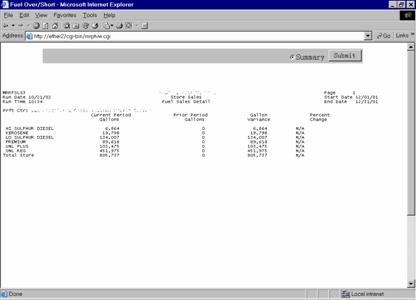
The following information is listed on Fuel Over/Short Detail reports:
Opening Gallons
Units Out
Units In
Closing Gallons
Stick Gallons
Over/Short
Profit Center
Fuel Product Category
Date
Totals
Note: Values on Fuel Over/Short reports are rounded to the nearest whole gallon. If there are prior periods where no data exists, the program will display either a zero (0) or N/A in the field.
The report columns are as follows:
Opening Gallons
The Opening Gallons column displays the beginning fuel gallon inventory for the specified date at the profit center.
Units Out
The Units Out column displays the sum of fuel gallon units sold for the specified date at the profit center.
Units In
The Units In column displays the sum of all fuel gallon deliveries received for the specified date at the profit center.
Closing Gallons
Closing Gallons values are calculated by using the following formula:
X + Y - Z
X = the Opening Gallons column value.
Y = the Units In column value.
Z = the Units Out column value.
Stick Gallons
The Stick Gallons column displays the Stick Gallons value for the specified date at the profit center.
Over/Short
Over/Short values are calculated by using the following formula:
(X – Y)
X = the Closing Gallons column value.
Y = the corresponding Stick Gallons column value.
The following sections are listed on the report:
ProfitCenter
The report displays the name and number of the profit center represented by the corresponding report data.
Fuel Product Category
The Fuel Product categories describe the fuel products being reported for the dates at the indicated profit center.
Note: The report displays one section for each product/profit center combination.
If you changed a product in a tank during the reporting period, the Fuel Over/Short report lists both the old and the new products. If you have tied tanks, the report also combines and lists data for the tanks.
Date
Each row beneath the fuel product category displays a date for each column value at the specified profit center.
Total
The Fuel Over/Short Detail report displays Total values for the Units Out, Units In, and Over/Short columns only. Totals are calculated by summing all corresponding row values.
If a profit center has child profit centers, you may click on the parent profit center’s hyperlink on the Fuel Over/Short report to view summary report information for its child profit centers.
Fuel Over/Short Child Summary reports are based on the same selection criteria you entered for the parent profit center.
Figure 19: Sample Child Fuel Over/Short Summary Report
Summary information for child profit centers is calculated in the same manner as it is for parent profit centers. See the Fuel Over/Short Summary report section for more information.
Click on the child profit center’s hyperlink to view a Fuel Over/Short Child Detail report.
Figure 20: Sample Child Fuel Over/Short Detail Report
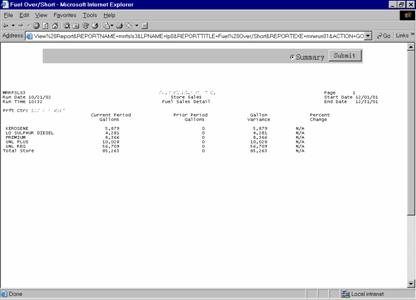
Detail information for child profit centers is calculated in the same manner as it is for parent profit centers. See the Fuel Over/Short Detail report section for more information.