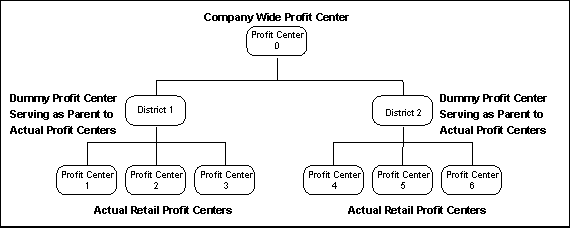
Since reports use profit center consolidation paths, you have the ability to “drill down” to various levels of detail. Consider the following example:
Your profit center consolidation path uses this consolidation method:
This type of profit center consolidation allows for the following drill down reporting methods:
Upper management can view reports at the company wide profit center level and drill down through the various levels simply by clicking on a link in the browser window. From the company wide view, they can select a district, and from the district view, they can select an individual store.
District managers can view reports starting at their district level and drill down to each of the individual stores within their district.
Store managers can view reports for only their stores.
Your ability to view drill down reports is dependent upon two factors:
The structure of the path. Consolidation paths are used to create a Parent-Child relationship between profit centers and establish the drill down structure for reporting. The management of your company will define the path to use for drill down reporting in your organization.
The assigned profit center for the username . When user accounts are created, each user is assigned to a profit center. Users can drill down to only those profit centers that are located lower in the path than their profit center and cannot view those profit centers that exist higher in the path than their profit center.