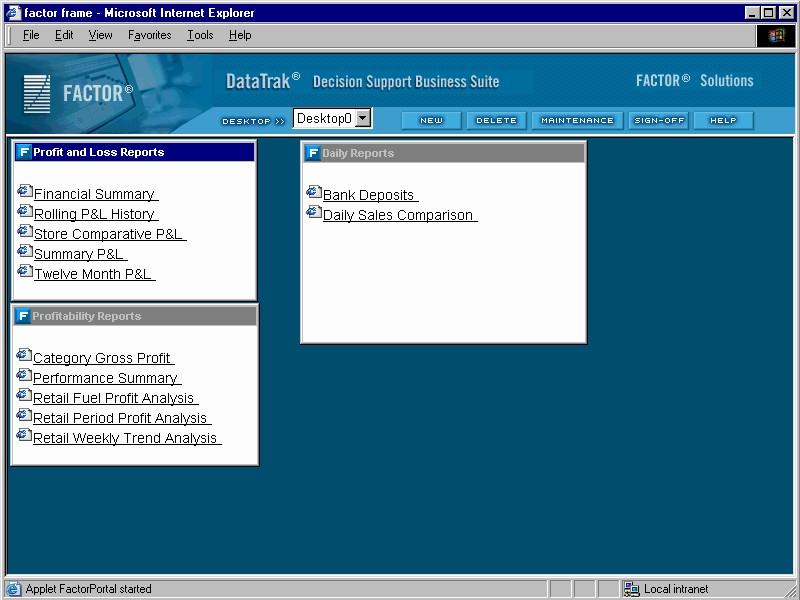
After you login to DataTrak, the system displays your Primary Desktop (Desktop0) Each user's Primary Desktop is created by the DataTrak administrator. This desktop view is the first view that is displayed when a user logs in to DataTrak. Only the administrator can make changes to a Primary Desktop.. The DataTrak administrator creates your primary desktop; you cannot change this desktop configuration. However, you can create additional desktop views to accommodate your needs. See the following sample primary desktop view:
This sample desktop view displays two document groups. If you have created any customized desktop views, you can display a different desktop by selecting it from the Desktop dropdown list on the DataTrak Menu.
The DataTrak menu is located at the top of the browser window, directly above the desktop area. Menu options include the following:
New: Click the New button to create a new desktop.
Delete: Click the Delete button to delete the currently displayed user-defined desktop. You cannot delete Desktop0
Desktop: Select a desktop name from the Desktop dropdown list to display the desktop.
Maintenance: Click the Maintenance button to access any DataTrak user maintenance programs, such as Data Alerts File Maintenance.
Signoff: Click the Signoff button to sign off DataTrak and return to the login screen.
Help: Click the Help button to access the DataTrak User Help system.