13 Week Inventory Comparison reports allow users to compare inside sales retail inventory values for a selected week with sales data from twelve prior weeks. This information can be used to isolate inventory trends at retail value.
Reports are available in summary and detailed format for both parent and child profit centers.
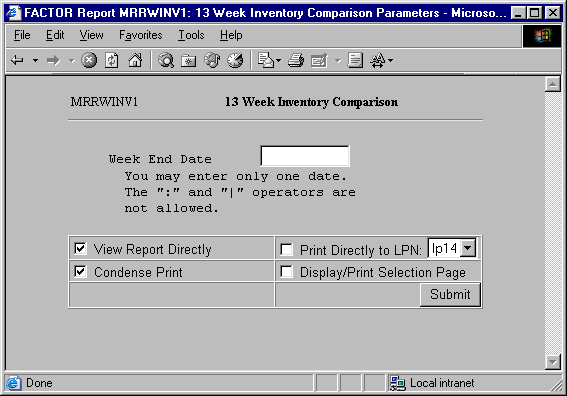
When you select 13 Week Inventory Comparison reports, the system displays the following report criteria screen:
The following selection criteria allow you to specify the information you want included on the report and the way the report is viewed.
Enter the ending date for the week you wish to compare. You must make an entry in this field and it must be in mm/dd/yy format. For example:
01/10/99
You may specify how you want to view and/or print the report by choosing from the following selections:
· View Report Directly
· Condense Print
· Print Directly to LPN
· Display/Print Selection Page
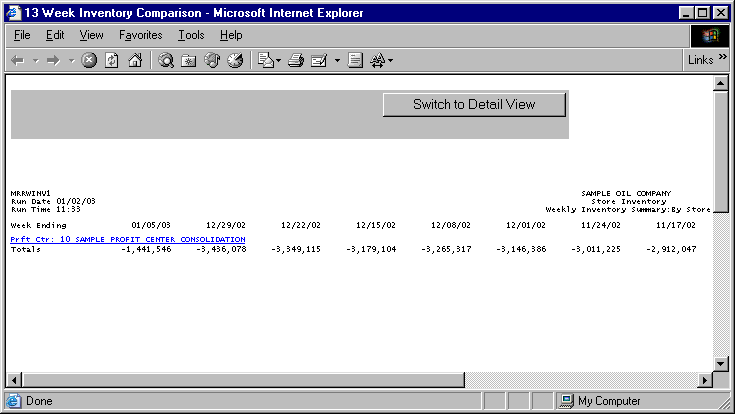
13 Week Inventory Comparison Reports print in landscape format.
The following information is listed on 13 Week Inventory Comparison Summary reports:
Week Ending Date
Profit Center
Totals
Note: Tables RS_CAT, RS_PURCLINE, and RS_SCAT are used to retrieve inventory data.
The report columns are as follows:
Week Ending Date
The Week Ending Date columns contain inventory data pertaining to the specified date. The first Week Ending Date is the date entered as selection criteria. Each subsequent Ending Date represents a prior week.
Note: Thirteen weeks are shown on the 13 Week Inventory Comparison report. Prior weeks are chosen by subtracting one week from the selected Week Ending date, and then subtracting one week from each subsequent Week Ending Date.
The following sections are listed on the report:
Profit Center
The report displays the name and number of the profit center represented by the corresponding report data.
If a profit center has a child profit center, it appears as a hyperlink. Clicking on the hyperlink allows you to view summary information for child profit center(s).
Totals
The Totals section displays the total inventories for each corresponding Week Ending Date column. Totals values are calculated by using the following formula:
(X +Y – Z)
X = the ending inventory value for the prior week.
Y = total purchases for the week.
Z = total retail sales for the week.
Totals values are rounded to the nearest whole dollar.
The 13 Week Inventory Comparison Detail report gives you more detailed information for the data reported on the 13 Week Inventory Comparison Summary report.
Values on the detail report are rounded to the nearest whole number. Because each value is rounded, Total values may differ from the Summary report. The Summary report should be considered more accurate.
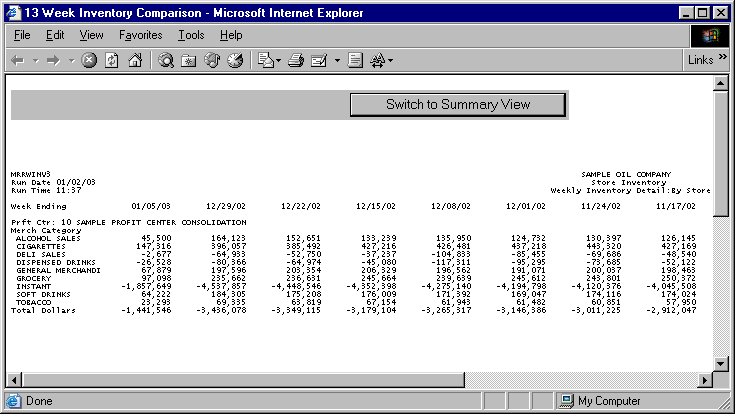
13 Week Inventory Comparison Reports print in landscape format.
The following information is listed on 13 Week Inventory Comparison Detail reports:
Week Ending Date
Profit Center
Merchandise Category
Totals
The report columns are as follows:
Week Ending Date
The Week Ending Date columns contain inventory data pertaining to the specified date. The first Week Ending Date is the date entered through the Selection Criteria screen. Each subsequent Ending Date represents a prior week.
Note: Thirteen weeks are shown on the 13 Week Inventory Comparison report. Prior weeks are chosen by subtracting one week from the selected Week Ending date, and then subtracting one week from each subsequent Week Ending Date.
The following sections are listed on the report:
Profit Center
The report displays the name and number of the profit center represented by the corresponding report data.
If a primary profit center has a child profit center, it appears as a hyperlink. Clicking on the hyperlink allows you to view summary information for child profit center(s).
Merchandise Category
The Merchandise Category section displays total merchandise sales values for the specified date. Underneath this heading, a listing for each individual category pertaining merchandise sales is displayed. Values are rounded to the nearest whole dollar.
Totals
The Totals section displays total inventories for each Week Ending Date column. Totals values are calculated by summing all corresponding column values. Totals are rounded to the nearest whole dollar.
If a profit center has child profit centers, you may click on the parent profit center’s hyperlink to view summary report information for its child profit centers.
The 13 Week Inventory Comparison Child Summary report is based on the same selection criteria you entered for the parent profit center.
Inventory values for the same thirteen weeks are calculated and depicted as they are for parent profit centers. See the 13 Week Inventory Comparison Summary report section for more information.
Click on the child profit center’s hyperlink to view a 13 week Inventory Comparison Child Detail report.
Detail information for child profit centers is calculated in the same manner as it is for parent profit centers. See the 13 Week Inventory Comparison Detail report section for more information.
You may notice a slight rounding difference between totals on detail and summary reports. Click here to see why.